|
You're reading Help for the Yandex Start on Android. |
Profile menu
To open the menu, tap (profile picture).
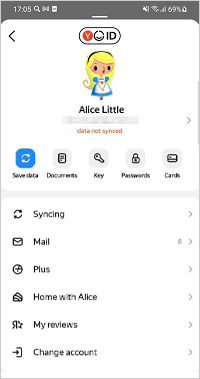
In the profile menu, you can:
(profile picture): Open your Yandex ID profile.
Documents: Go to your documents.
Key: Get a one-time password (only when two-factor authentication is enabled).
Passwords: Open the password manager.
Cards: Manage your bank cards in Yandex Pay.
Syncing: Set up syncing to access your data from any device and enable data recovery.
Mail: Open Yandex Mail.
Activate Plus or Plus: Activate or manage your Yandex Plus multi-subscription. The Yandex Plus bonus points will also appear here.
 Home with Alice: Manage connected devices.
Change account: Switch to another account.
App settings: Go to settings.
Help and Feedback: Open Help, send us a question via the form, or start a support chat.