Courier performance report
A report on the quality of couriers' work provides data on order completion for a certain period of time. Use it to:
- Find out which couriers are most often late or violate the delivery schedule.
- See how the actual order completion time corresponds to the delivery interval.
- Evaluate other parameters that are important for your tasks.
You can also get information about the delivery quality using the API.
Creating a report
To generate the report, specify the date range and click Show. The range should not exceed 31 days.
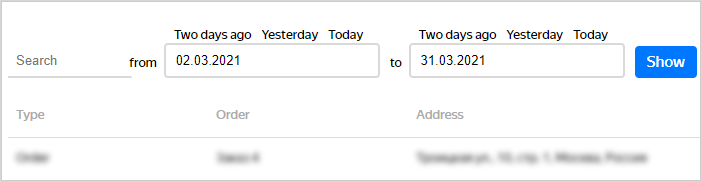
To filter the results, after generating the report, enter the necessary parameters in the Search box.
Configuring the report layout
To configure the display and order of columns, click . This opens a section with a list of columns where you can:
- Show or hide individual columns.
- Drag and drop columns to reorder them.
- Click Reset to cancel your changes.
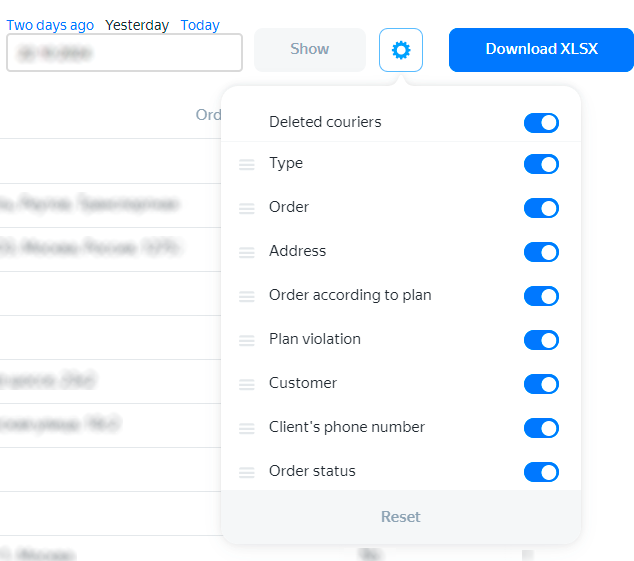
Adjust the column width to make sure all important elements fit on the page:
- Hover over the column name. You'll see the
 icon next to it.
 - Click and hold the left mouse button to hover over the icon.
- Move left and right to change the width.
If you need an Excel report, click Download XLSX.
Note
By default, data on deleted couriers is included in the report, but the phase Courier deleted is shown next to their logins. You can exclude deleted couriers from the report in the display settings.
Report field description
For more information about report fields, see the table below. The report also displays custom fields if their value is set.
| Name | Explanation |
|---|---|
| Deleted couriers | Shows deleted couriers |
| Type | Order type |
| Name | Order number or depot ID |
| Address | Order address if it was explicitly specified |
| Order according to plan | The order number according to the plan. If the courier breaks the order sequence, this field value is different from the one in the Order field |
| External order number | Order number in the client's system |
| Plan violation | "Yes" if the plan was violated, "No" if it wasn't |
| Client | Client name |
| Client's phone number | Client's phone number |
| Order status | Order status set by the courier |
| Courier | Courier ID |
| Courier's phone number | Courier phone number |
| Route | Route number assigned by the Planning service. To open the page of a route, click its number. This action is only available in Routing Workspace |
| Route link | Link to the route page. The field is only available in the Excel report |
| Transportation method | Courier's transportation method |
| Arrival at the point radius | Time and date of arrival at the order location or depot |
| Cost | Order cost, if specified |
| Payment status | Order payment status |
| Visit to point counted | Time and date of order completion |
| Leaving the location radius | Time and date of the departure from the order address or depot |
| Detection radius, m | Set in the company settings if the delivery status is determined automatically |
| Order delivered (or canceled) | Time and date when the order was marked Delivered or Canceled |
| Order completion time | Time and date of the actual order completion. You can see them in the interface only for orders with the Delivered or Partially delivered status. If the system can't determine the courier's location or the order is canceled, the Order completion time won't be displayed in the interface |
| Order completion latitude | Courier's coordinates at the actual order completion. You can see them in the interface only for orders with the Delivered or Partially delivered status. If the system can't determine the courier's location or the order is canceled, the latitude and longitude of the order completion won't be displayed in the interface |
| Order completion longitude | ^ |
| Order handling time, min | The time set for handling an order, in minutes. For more information, go to the Order card section |
| Handling time at location, min | The time set for handling orders at a location, in minutes. For more information, go to the Order card section |
| Time window | The order time window that was uploaded to Planning |
| Time window (time only) | The order time window, the date isn't specified |
| Deviation from the time window, min | Time window violation in minutes |
| Username | Courier's username. For more information, see the Vehicles sheet description in the Instructions for completing an Excel file. |
| Distance between the status entry point and the order | The distance between the courier's location and the delivery address at the time when the delivery was marked completed. This parameter lets you identify couriers who mark the order as delivered in advance, before reaching the customer |
| Order approval time | Time when the order status was changed to Approved. This can be done by a courier or manager |
| Call with approval less than 30 minutes before delivery | Shows which couriers inform clients about their arrival in advance |
| Depot number | The depot that the order was shipped from |
| Actual mileage, m | The actual mileage is calculated: — For the first order: From the depot or starting point to the detection radius of the first order. — For subsequent orders: From the detection radius of the previous order to the detection radius of the next one. If the courier spends insufficient time inside a detection radius, the visit may not be counted. The actual mileage on such sections will be zero even if there is a track |
| Actual handling time, min | The actual order handling time |
| Transit idle duration, min | Downtime between two route points. Marked N/A if there is no data. For more information, see Courier downtime. |
| Location idle duration, min | Downtime at one of the route points. Marked N/A if there is no data. For more information, see Courier downtime. |
| Route date | The date when the route was started |
| Latitude, Longitude | Location coordinates. Only shown for orders with the Delivered or Partially delivered status. |
| Updated latitude, Updated longitude | Data that the courier changed in the app manually, because the latitude coordinate of the point didn't match the place where the delivery was made. You can use the updated coordinates for future planning. Learn more |
| Comment | Order comments that were uploaded to Planning. |
| Window violation type | Delayed deliveries are marked Later, early ones are marked Earlier, and orders without a violation are marked On time. |
| Order weight, kg | Order weight if it was specified |
| Order volume, m³ | Order volume (if the length, width, and height were specified) |
| Comment on "Not approved" | The courier's comments when setting the Not approved status |
| Comment on "Approved" | The courier's comment when setting the Approved status |
| Comment on "Delivered" | The courier's comment when setting the Delivered status |
| Comment on "Partially delivered" | The courier's comments when setting the Partially delivered status |
| Comment on "Canceled" | The courier's comment when setting the Canceled status. |
| Comment on "Couldn't reach by phone" | The courier's comments when setting the Couldn't reach by phone status. |
| GPS tracker number | The number of the GPS tracker that's installed on the courier's vehicle. The field is only available to users with the Administrator role. |
| Delivery rating | Delivery rating if provided by the customer |
| Delivery review | Delivery review if provided by the customer |
| Confirm order by SMS? | Order receipt must be confirmed via SMS |
| Order confirmed by SMS | Status of order confirmation via SMS |
| External customer number | External order number from the client's system |